

Hosted Checkout
Overview
CrissCross offers a Hosted Checkout, a fully managed front-end payment interface designed to handle the entire payment flow on behalf of merchants. It renders all available payment methods dynamically, manages necessary redirects and MFA challenges, and ensures PCI-compliant handling of sensitive data.
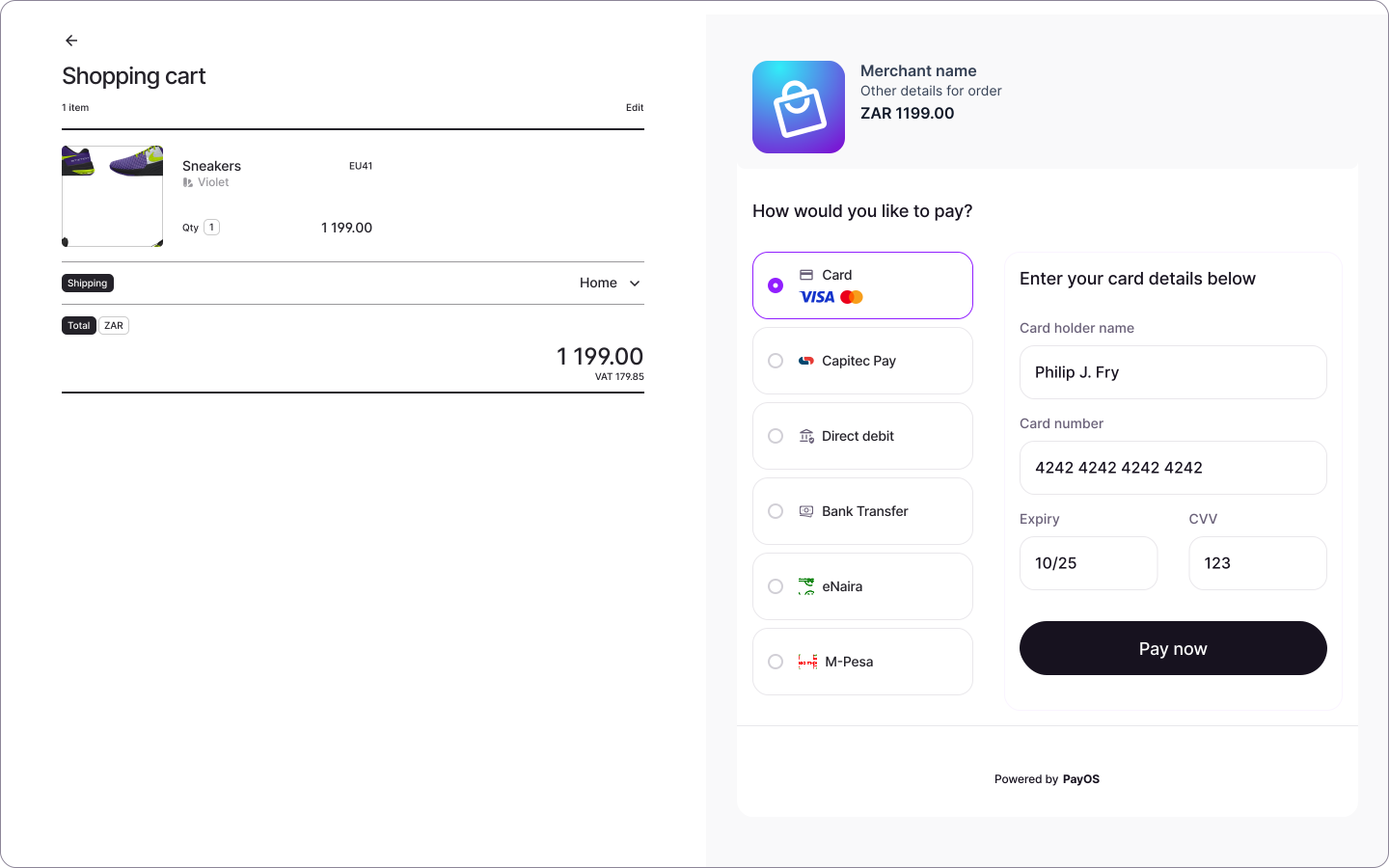
The Hosted Checkout is an optional payment initiation flow that manages all user engagement and interactions required by the relevant payment method. This approach is ideal for merchants seeking a streamlined, low-compliance solution.
However, CrissCross also offers an alternative integration method:
- Direct Integration: Build your own checkout and call the API directly, for maximum flexibility and control over the payment process. Available for bank, mobile-money, and other non-card payment methods — card payments always run on Hosted Checkout.
Key Features
-
Dynamic Payment Method Rendering:
- Payment methods are rendered based on dynamic rules configured by the merchant. This process considers a broad set of variables, including those established during merchant configuration and those provided in the payment initiation call.
- Digital wallets are part of this: when Apple Pay or Google Pay is enabled on your account, the hosted checkout presents the wallet button automatically on devices and browsers that support it, with no wallet-specific integration work.
-
3D Secure and MFA Support:
- Automatically handles multi-factor authentication (MFA) flows like 3D Secure, providing a secure checkout experience with minimal friction.
-
PCI Compliance:
- Merchants avoid direct exposure to sensitive payment data, reducing the burden of PCI-DSS compliance.
-
Customizable Checkout Experience:
- Merchants can customize the checkout to reflect their brand identity and align with their user experience (UX) preferences by adjusting colors and uploading their logo.
How It Works
-
Get an access token
POST /v1/auth/oauth2/tokenwith yourclient_idandclient_secret. Tokens are valid for 24 hours — store one and reuse it rather than requesting a new one per call. See Authentication.
-
Create a checkout session
POST /v1/checkout/sessionwith the amount, currency, your reference, and the payer’s details. You get back asessionIdand apaymentLink. Keep both — thesessionIdis how you match everything that follows back to this order, and thepaymentLinkis returned only in this response.
-
Send the buyer to
paymentLink- Redirect them to the URL exactly as returned. It already carries the signature that authorises the session, so do not rebuild it by hand. CrissCross renders the available payment methods, collects the details, and handles any 3-D Secure or OTP step. A transaction (
transactionId) is created the moment the buyer submits a payment method — not when the session is created or the link is opened. See Payment Status & Recovery for how the two identifiers relate.
- Redirect them to the URL exactly as returned. It already carries the signature that authorises the session, so do not rebuild it by hand. CrissCross renders the available payment methods, collects the details, and handles any 3-D Secure or OTP step. A transaction (
-
Handle the return
- When the buyer finishes, they are sent to your
redirectUrlwith?status=completed,?status=failedor?status=cancelledappended. Treat this as a display signal only — show a confirmation or a retry page. It tells you the buyer came back, not that the money moved.
- When the buyer finishes, they are sent to your
-
Confirm with the webhook
- The webhook is the authoritative outcome. Each event carries the
transactionId, thesessionId, and yourmerchantReference— match it to your order, verify its signature, and only then fulfil. A buyer who closes the tab still produces a webhook; a buyer who returns with?status=completedmay still be pending. See Webhook Events.
- The webhook is the authoritative outcome. Each event carries the
Steps 4 and 5 are easy to conflate. The redirect is what the buyer did; the webhook is what happened to the payment. Fulfil on the webhook.
Example Checkout Session Request:
Example Response:
The payerId is a persistent identifier for the customer behind this session. Store it against your customer record — you can pass it back on future sessions to recognise a returning customer. See Payer ID for details.
The signature authorises this session on the hosted checkout page. It is already appended to paymentLink, so redirect the buyer to that URL exactly as returned and you never need to touch the field itself. Anyone holding it can act on the session, so keep it out of logs and analytics. It is not related to the svix-signature header used to verify webhooks — different mechanism, different purpose.
Adaptive Currency Conversion charges the payer in their own currency while you price in yours. The conversion is priced one of two ways: by a per-session rate minted automatically at creation (the default — nothing to set), or by a rate lock you fetched ahead of time and pass as rateLockId — the same locked rate then holds across every session you attach it to. With a rate lock, the create response also returns fxCommit with the amount the payer will be charged; with the per-session rate, the response above returns identifiers only — read the session back and inspect fxCommit.
Handling Webhooks
CrissCross sends webhooks for key events, so merchants can update order statuses in real time. For a hosted checkout session, the two you’ll act on most are:
transaction.completed: Update order status to ‘Paid’ and proceed with fulfillment.transaction.failed: Notify the customer and allow them to retry.
See Webhook Events for the full event catalogue and payload schemas, and Webhooks for signature verification and delivery.
The delivered body is the transaction itself, with no envelope around it — match each event to your order on the top-level sessionId or merchantReference, and verify its signature before acting on it.
Customizing the Checkout Experience
Merchants can configure the following elements:
- Logo: Upload your logo to personalize the checkout page.
- Theme: Adjust colors to match your brand identity.
- Payment Method Order: Control the order in which payment methods appear.
FX Rate Display (Adaptive Currency Conversion)
When a session initiates in one currency and collects in another, Adaptive Currency Conversion converts for the payer, and the hosted page shows both the original charge and the converted amount they’ll actually be debited. The conversion is priced either by a per-session rate minted at creation (the default; refreshes on the page automatically if it expires mid-checkout) or by a rate lock passed as rateLockId (frozen for the lock’s lifetime — no refresh).
Merchants can toggle each element of the buyer-facing breakdown via paymentAttributes on the session. All three toggles default to shown — set to "false" to hide.
All paymentAttributes values are strings. To hide an element, pass "false"; anything else (or omitting the key) leaves it visible.
The fee percentage shown reflects the per-currency-pair markup configured on the merchant’s account before they start transacting. Use these paymentAttributes to shape what the payer sees on the checkout page.
Benefits of Using Hosted Checkout
- Faster Go-to-Market: Launch in days, not months, with a pre-built, compliant checkout that works across all local payment methods.
- Fully Customizable: Match your brand with your logo, colors, and design to increase trust, while we handle the infrastructure and compliance.
- Higher Conversion: Optimized user flows and localized payment options help boost completion rates by over 10% on average across markets.
- Reduced Compliance Burden: CrissCross handles sensitive data securely, reducing PCI compliance requirements for merchants.
- Seamless Customer Experience: A smooth payment journey with automatic handling of redirects and authentication.
- Rapid Integration: The Hosted Checkout can be integrated with minimal development effort.
Example Integration Flow
Conclusion
The CrissCross Hosted Checkout offers a comprehensive solution for managing payments with minimal effort. It provides dynamic payment method support, automatic handling of MFA flows, and reduces compliance burden. Merchants can focus on their core business while CrissCross ensures a smooth and secure payment process.