

Adaptive Currency Conversion
Price in one currency, collect in the payer’s — priced per session or with a rate lock
Adaptive Currency Conversion (ACC) lets you price in one currency (for example USD) and collect in another (for example KES). When a checkout session needs a conversion, the payer sees and pays the converted amount in their own currency, and the applied rate is snapshotted onto every transaction attempt for reconciliation.
There are two ways to price the conversion:
- Per-session rate (default) — nothing to set. An implicit FX quote is minted at session creation, valid for minutes, and refreshed automatically on the hosted page if it expires.
- Rate lock — pass a
rateLockIdat session creation to price the session with a rate you locked ahead of time: valid for hours and reusable across many sessions. See Rate Locks.
ACC must be enabled on your account before you can use it, and that is something we switch on for
you — there is no self-serve toggle. Until it is enabled, any session that would need a conversion
is rejected with 403 and error: "fx_not_enabled", whichever pricing method you use. Get in
touch to have it enabled for the currency pairs you need.
Choosing between the two
Both surface an all-in rate at checkout — the difference is when the rate is committed and how long it holds.
Use a rate lock when you want one rate to hold across many checkouts (steady-state pricing). Use the per-session rate when you just need the payer’s currency converted at the moment of purchase.
When conversion kicks in
ACC activates when all of the following are true on session creation:
- The session
currency(the currency you price in) differs from the payer’scollectionCurrency. IfcollectionCurrencyis omitted, we default to the primary currency forpayerDetails.location. - The merchant is provisioned for FX at checkout for the initiation→collection pair.
Which option prices the conversion depends on the request: with a rateLockId the session is priced at the lock’s all-in rate (the lock’s quote currency must match the collection currency); without one, the per-session rate is minted automatically. If no conversion is needed, the payer is simply charged in the initiation currency.
With a rate lock, the Create Checkout Session response returns the conversion as fxCommit. With the per-session rate, the creation response does not return it — you get back identifiers only; read the session back with Get Checkout Session and inspect fxCommit. Either way the block is the same:
What the payer sees
When a conversion is applied, the hosted checkout page shows the payer the original charge, the converted amount they will actually be debited, and the effective all-in rate — whichever option priced it. With the per-session rate, the rate refreshes on the page if the underlying quote expires mid-checkout, so the payer never sees a stale rate.
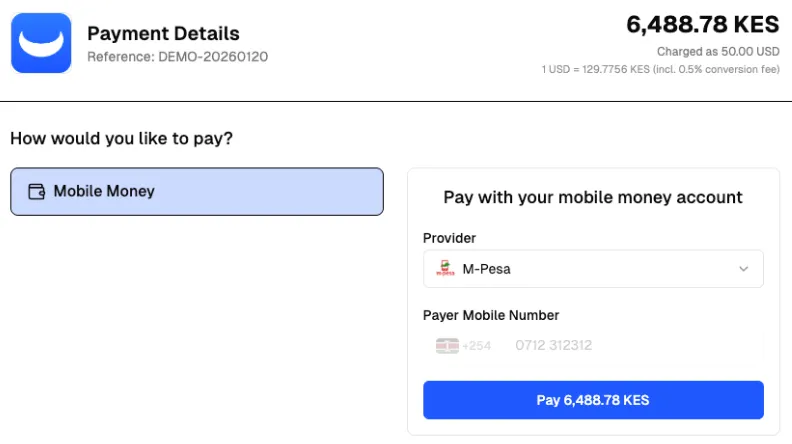
Merchant-controlled display
You can toggle each element of the buyer-facing FX breakdown via paymentAttributes on the session. All three toggles default to shown — set to "false" to hide.
All paymentAttributes values are strings. To hide an element, pass "false"; anything else (or omitting the key) leaves it visible.
The all-in rate reflects the per-currency-pair markup configured on your account before you start transacting, so you control how much of the spread is passed on to your payers. Use these paymentAttributes to shape what the payer sees on the checkout page.
The FX commit on the session
Whenever a conversion has priced a session, Get a checkout session returns it inline as fxCommit:
fxCommit.pricingModel tells you which option priced the conversion: SPOT_QUOTE for a per-session quote, or RATE_LOCK for a session priced by a rate lock — in which case fxCommit.quoteId is the rlk_ rate lock id.
fxCommit on the session is the latest committed conversion. The rate a payer actually transacted at is captured per-attempt on the Transaction — see the FX snapshot fields (collection, fxMidRate, fxAllInRate, fxMarkupBps). These are immutable once written and preserved for the life of the transaction.
Per-session rate expiry — refresh on the page, reject on stale ingress
A per-session quote is valid for minutes, not hours. Two things happen when it approaches expiry:
- On the hosted checkout page — the page reads the new rate from the session, updates the displayed converted amount, and lets the payer proceed at the refreshed rate. No action needed by the merchant.
- At payment ingress — a payment submitted against an expired
fxCommitis rejected with422(stale quote). The payer must refresh the page and re-submit against the current rate. This is a safety net for direct-API integrations and any race between rate refresh and payment submission.
Rate locks work differently: their expiry is hours, not minutes, and there’s no in-place refresh — you fetch a new lock. See Rate locks — validity and expiry.
Reconciliation
Every transaction attempt carries an immutable snapshot of the rate it was actually charged at:
collection—{ amount, currency }the payer was debited (major-unit decimal string + ISO 4217).fxMidRate— spot mid-market rate at the moment of commit.fxAllInRate— mid rate + markup — the rate the transaction was actually converted at.fxMarkupBps— markup in basis points (100 bps = 1%).
For reporting and reconciliation, the transaction’s snapshot is authoritative. The session’s fxCommit reflects the latest quote — which may have refreshed after a transaction was attempted. With a rate lock the rate never refreshes, so every transaction priced by the same lock reconciles at the same fxAllInRate — see Rate locks — reconciliation.
What you don’t need to do (per-session default)
- You don’t need to fetch a rate ahead of checkout — the session mints the quote for you.
- You don’t need to refresh anything from the merchant side — the hosted page and the ingress guard handle it.
- You don’t need to reconcile against an external quote — the per-attempt snapshot on each transaction is the source of truth.
If you want an explicit, held rate instead — for example to guarantee the same price across a browsing session or across many payers — use a rate lock.